Post
You don't need to buy a pattern or install software. One photo is all it takes — Stitch Pattern Maker converts it into a print-ready DMC cross stitch pattern, with thread numbers, entirely in your browser. When I built this tool, the two non-negotiables were: no installation, and no server processing. Your photo never leaves your device.
How to make a pattern — 4 steps
① Upload your photo
👉 https://stitchpatternmaker.app → drag your image in or click to browse
Supports JPG and PNG. Higher resolution photos produce better pattern quality.

② Set your options
Choose pattern size, color count, and dithering style. If you're just starting out, the defaults below work well for most photos.
| Option | Beginner recommendation | Notes |
|---|---|---|
| Pattern size | 100×100 | Good entry-level size |
| Max colors | 40 | Balanced color representation |
| Render quality | Balanced | Dithering supported, fast |
| Dithering | Floyd | Smooth color transitions |

③ Click Generate
The pattern appears on the canvas. Toggle between Color, Symbol, and Mixed preview modes to check how it looks.
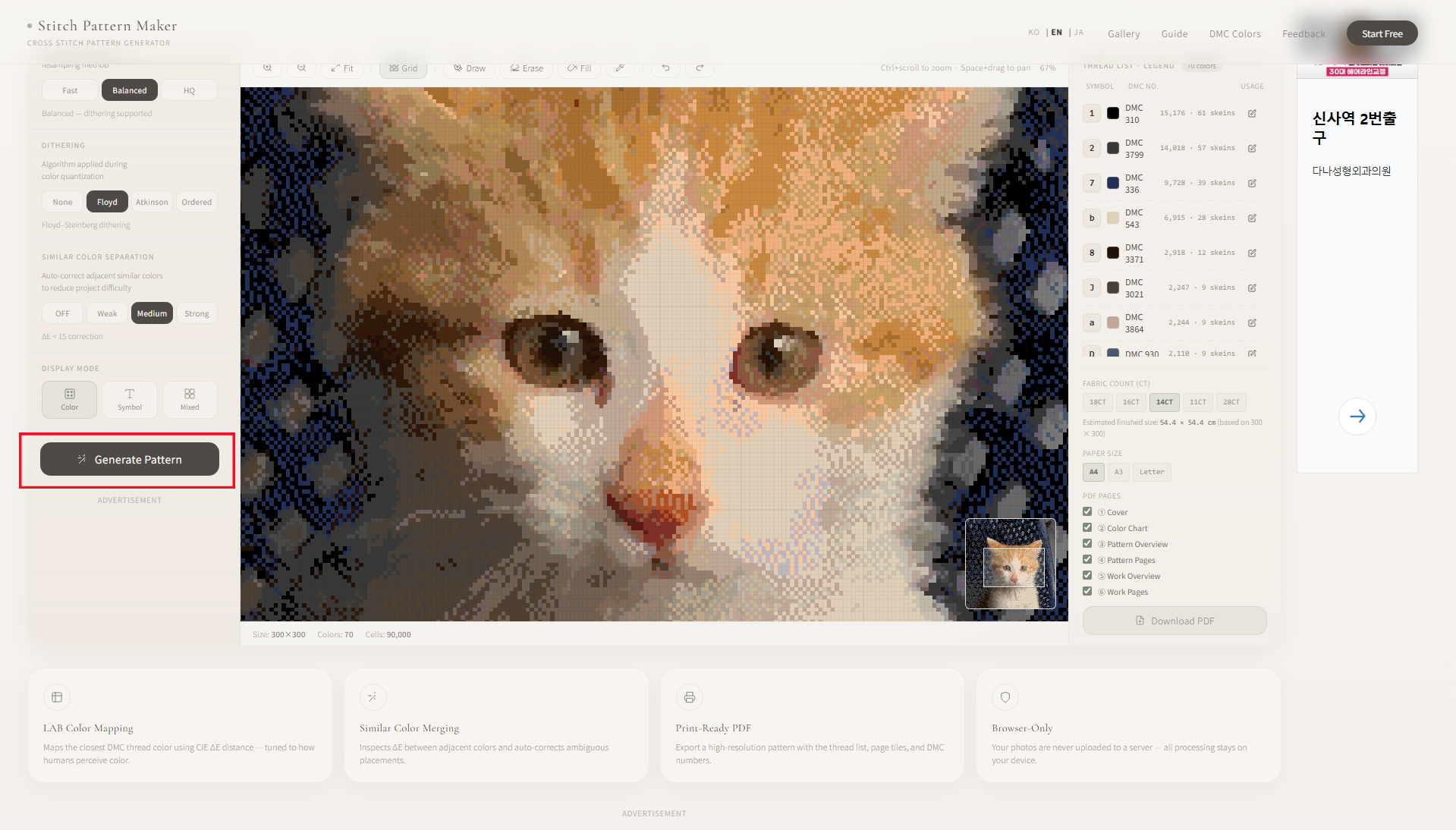
④ Save as PDF
Export a high-resolution PDF with thread list, page breaks, and DMC numbers. Ready to print and stitch.

How do I choose the right pattern size?
- 🧵 50×50: Small projects, first piece, quick finish
- 🧵 100×100: Best starting point for most beginners
- 🧵 150×200 / 200×200: Portraits and detailed scenes that need more resolution
Start at 100×100 and scale up once you've finished a piece. Larger sizes mean more colors and significantly longer stitching time.
What if there are too many colors?
Lower the "Max colors" setting to merge similar shades. 40 colors works well for most photos — even complex portraits usually fit in 60 or fewer.
The "Auto color separation" feature also helps: it detects adjacent similar colors and adjusts them automatically, making the pattern easier to work without mistakes.
Preview modes
| Mode | Use for |
|---|---|
| Color | Checking color distribution |
| Symbol | Reference while stitching |
| Mixed | Color + symbol at the same time |
FAQ
Does my photo get sent to a server?
No. Everything runs in your browser. Your photo never leaves your device — which matters when you're using personal or family photos.
Can I use the pattern commercially?
Free for personal and non-commercial use.
Does it work on mobile?
Yes, it works in mobile browsers. For option adjustments and canvas editing, a tablet or desktop is more comfortable.
No install. No account. One photo upload, one DMC pattern.
'나름의 개발 > Stitch Pattern Maker App' 카테고리의 다른 글
| DMCカラー表の読み方と糸の選び方 (0) | 2026.07.13 |
|---|---|
| クロスステッチ図案を無料で作る方法 (0) | 2026.07.06 |
| 십자수 도안 무료로 만드는 방법 (0) | 2026.07.06 |
| Cleaner Patterns, Easier Stitching — Stitch Pattern Maker Update (0) | 2026.06.15 |
| 図案がすっきりしました — Stitch Pattern Maker アップデート (0) | 2026.06.15 |